Semrush Review: for Keyword Research
A keyword can attract thousands of searches and still bring no useful traffic. The real challenge in Semrush keyword research is finding terms with enough demand while avoiding competition that exceeds your site’s authority.
This Semrush Review for keyword research examines more than basic search-volume lookups. It covers the Semrush Keyword Magic Tool, keyword difficulty, search intent, Semrush competitor research, content planning, Semrush pricing, and day-to-day usability. The verdict depends on Semrush keyword data, workflow speed, feature depth, learning curve, and value for different users.
Semrush Review: for Keyword Research What the Toolkit Covers
Semrush treats keyword research as a connected process rather than one report. Several Semrush SEO tools help you discover keyword ideas, study competitors, organize terms, and track results after publishing.
Semrush Review: Keyword Magic Tool expands a seed idea
Enter a broad seed keyword, choose a country or regional database, and the Semrush Keyword Magic Tool returns related ideas. You can filter results by broad match, phrase match, exact match, or related keywords.
Other filters include Semrush search volume, Semrush keyword difficulty, intent, cost per click, and Semrush SERP features. Semrush also groups related terms, which helps you build topic clusters instead of reviewing one huge list.
Start with several seed terms. Include product names, services, customer problems, and the words your audience uses in real conversations to find useful Semrush keyword suggestions.
Keyword Overview validates targets quickly
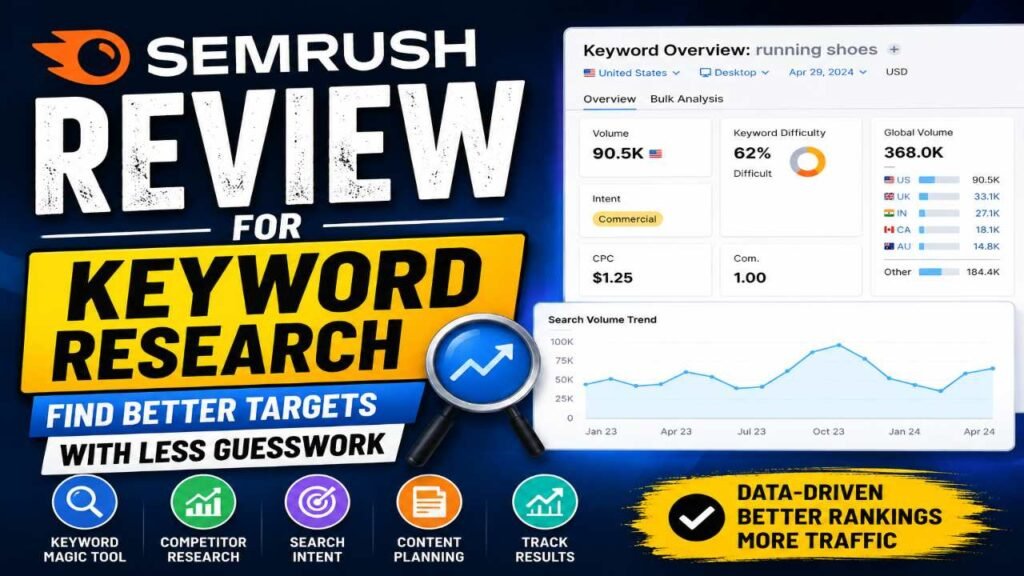
Semrush Keyword Overview gives a fast read before you add a term to a larger plan. Review estimated volume, difficulty, intent, cost per click, competitive density, trend data, and SERP features as part of your Semrush Review keyword analysis.
No single metric should decide your target. A high-volume term may have poor business value, while a low-volume phrase may bring qualified buyers. Compare the Semrush keyword difficulty with the strength, relevance, and quality of the pages ranking now.
Semrush Review: Competitor tools reveal missed opportunities
Semrush Organic Research and Semrush Keyword Gap show terms that competing domains rank for while your site has little or no visibility. You can compare shared, missing, weak, and untapped competitor keywords across several competitor websites.
This Semrush competitor analysis often reveals content topics, commercial phrases, Semrush long-tail keywords, and subtopics that existing pages lack. Compare direct competitors, then filter for terms where they rank well and your site does not appear.
Semrush delivers useful keyword data, but metrics need context
Semrush offers helpful estimates for planning, but no third-party SEO tool can show the exact number of future visits. The Semrush Review keyword data works best when combined with live search results and first-party analytics.
Search volume and trends support prioritization
Estimated Semrush search volume helps compare demand between similar terms. Trend data can reveal seasonal interest, rising topics, or phrases that are losing attention.
Volume is not a promise of traffic. Similar keywords may show overlapping results, national averages may hide local demand, and seasonal topics can look weak outside their peak period. Once your site earns impressions, compare Semrush search volume data with Google Search Console data.
Keyword Difficulty estimates ranking effort
Semrush Keyword Difficulty is a prioritization signal based on the competition in the current results. It can help you avoid targets that demand links, authority, and resources your site does not yet have.
Review it alongside the ranking pages’ backlink profiles, content quality, intent match, brand strength, and topical authority. A difficult keyword can suit an established site, while an easy term may have little business value.
Look for terms with realistic difficulty, clear intent, and a direct link to your products, services, or content goals.
Intent and SERP features improve page fit
Semrush labels common search intent types as informational, navigational, commercial, and transactional. These labels help you decide whether a term needs a guide, product page, comparison, or category page.
Semrush SERP features also affect opportunity. Featured snippets, People Also Ask boxes, local packs, shopping results, videos, reviews, and image results can change what users see before organic listings.
Match your format to the dominant results. A commercial term may need a comparison page, while an informational term may need a clear step-by-step guide.
Semrush turns keyword lists into content opportunities
Finding terms is only the start. Semrush also helps organize them, assign them to pages, and measure whether your choices produce useful results as part of a broader Semrush content strategy.
Keyword groups make large projects manageable
Group phrases by topic, intent, funnel stage, product, location, or business priority. One primary keyword and several close secondary terms can guide each page without creating duplicate work.
Avoid building a separate page for every minor variation. If the same search intent appears behind several phrases, one complete page may serve them all.
Keyword Strategy Builder supports content planning
Semrush Keyword Strategy Builder can centralize ideas and turn research into a Semrush content planning roadmap. Prioritize terms using difficulty, volume, intent, relevance, current rankings, content gaps, and business value.
Your plan should separate new pages from existing pages that need better optimization. It should also include supporting articles, commercial landing pages, and pages that need stronger intent alignment.
Add a business-value score. Traffic potential alone can push useful sales terms below broad informational keywords.
Position Tracking measures progress
Semrush Position Tracking shows ranking changes, visibility trends, estimated traffic, SERP feature ownership, and competitor performance. You can also segment results by device and location.
Rankings should sit beside impressions, clicks, conversions, and assisted revenue. A position increase matters less if the page attracts the wrong visitors.
Track a focused Semrush keyword tracking set for each page. Trying to monitor every phrase a page may rank for creates noise and weakens reporting.
Semrush’s workflow suits different SEO users
The platform offers depth, but that depth affects ease of use. Its value changes based on how often you research keywords and how many sites or markets you manage, making the Semrush SEO workflow different for each user.
Beginners get guidance but face a learning curve
New users can start with seed-keyword expansion, filters, intent labels, competitor comparisons, and keyword grouping. These Semrush SEO features make the first research session fairly accessible.
Large data sets and overlapping metrics can still confuse beginners. The main risk is choosing keywords based on volume while ignoring Semrush search intent and business value.
Start with one workflow: discover ideas, inspect the results, select targets, map them to content, and track rankings.
Agencies and advanced teams gain scale
Agencies and larger teams can benefit from multiple projects, regional databases, historical data, competitor monitoring, reports, and shared workflows. Semrush can support several clients, locations, and content programs in one account, making Semrush for agencies useful at scale.
Advanced SEOs can combine Semrush keyword analysis with technical audits, backlink analysis, competitor content reviews, Google Search Console, and conversion analytics. Use Semrush to form and rank hypotheses, then test them against live results and first-party data.
Check limits for projects, exports, tracked keywords, users, and reports before committing. Reusable Semrush Review keyword research templates can reduce repeated work across clients or departments.
Semrush Review: pricing and limits determine its value
Semrush pricing may be a strong investment for active SEO teams, but occasional users may pay for more capacity than they need. The right Semrush pricing plan depends on usage, not the headline monthly price.
Choose a plan based on actual usage
Review the number of projects, daily searches, Semrush keyword exports, historical data access, tracked terms, user seats, reporting tools, and regional databases. These limits can affect your workflow more than the feature list.
Semrush pricing and plan limits can change, so check the official pricing page before publication or purchase. Estimate your monthly searches, exports, tracked keywords, and users first.
Third-party estimates remain a limitation
Search volume may differ from actual searches, and Semrush Keyword Difficulty cannot fully measure content quality or topical authority. Traffic estimates may also miss changes in SERP design, user behavior, and algorithm updates.
Search intent can vary by location and context. Semrush should support Google Search Console, Google Analytics, live SERP reviews, customer research, and conversion data rather than replace them.
Use the metrics to prioritize ideas, then confirm each major decision through business relevance and first-party performance.
A practical Semrush keyword research workflow
A repeatable process prevents attractive metrics from taking over your content plan. Begin with business needs, then use Semrush to test and organize possible targets through a practical Semrush keyword strategy.
Start with goals and audience problems
Define your audience, products, services, customer pain points, revenue priorities, location, and funnel stage. Write down customer questions, objections, comparisons, and purchase triggers before opening the Semrush Keyword Magic Tool.
This keeps research tied to outcomes. A phrase with modest volume can deserve priority if it signals a high chance of becoming a lead or sale.
Expand, filter, and qualify ideas
Enter several seed terms and select the correct country, region, or database. Filter by intent, volume, difficulty, and SERP features, then remove irrelevant or unclear phrases.
Group or export qualified Semrush Review keyword ideas after reviewing the live results. Manual SERP checks matter because tools cannot fully explain page quality, brand bias, or what users expect.
Map keywords and measure outcomes
Assign each cluster to existing content, a new article, product page, service page, category page, or comparison page. Set success measures such as impressions, click-through rate, organic clicks, rankings, leads, sales, and assisted conversions.
Review the keyword map after publishing. Look for cannibalization, missed subtopics, weak intent alignment, and pages that need stronger content.
Final Verdict: Semrush is powerful when metrics guide strategy
Semrush Review is especially strong for expanding keyword ideas, studying competitors, assessing intent, reviewing SERP features, organizing opportunities, planning content, and tracking several projects or markets.
The drawbacks are clear. Semrush pricing may challenge occasional users, the interface can feel complex at first, and Semrush keyword metrics are estimates that need validation. Feature and usage limits also require a close match with your actual workflow.
Choose Semrush when Semrush competitor intelligence, historical data, scalable research, and integrated SEO work justify the cost. Consider a simpler tool when you manage one small site, research keywords rarely, or have a strict budget.
Use Semrush to find and prioritize opportunities, inspect the live SERP before publishing, connect each target to a business goal, and validate results with analytics and conversion data.