
Convert PDF files into editable Word documents (DOCX) online for free.
Convert your PDF to Word in seconds.
Your files are processed in your browser.
Get accurate and editable Word documents.
Convert as many files as you need.
Have a PDF that you need to edit? If the file was created as a PDF, changing the text or updating the document can sometimes be frustrating. You may find yourself copying text manually or looking for software just to make a few simple changes.
Zenokit PDF to Word Converter gives you an easier way to turn PDF files into editable Word documents. Upload your PDF, let the converter process it, and download the resulting Word file when it’s ready.
A PDF to Word Converter is a tool that changes a PDF document into an editable Word format.
PDF files are great for sharing because they usually keep their layout consistent across different devices. However, editing a PDF isn’t always as convenient as editing a Word document.
Converting the PDF to Word can make it easier to:
Instead of rebuilding the document from scratch, you can convert the PDF and continue working with the content.
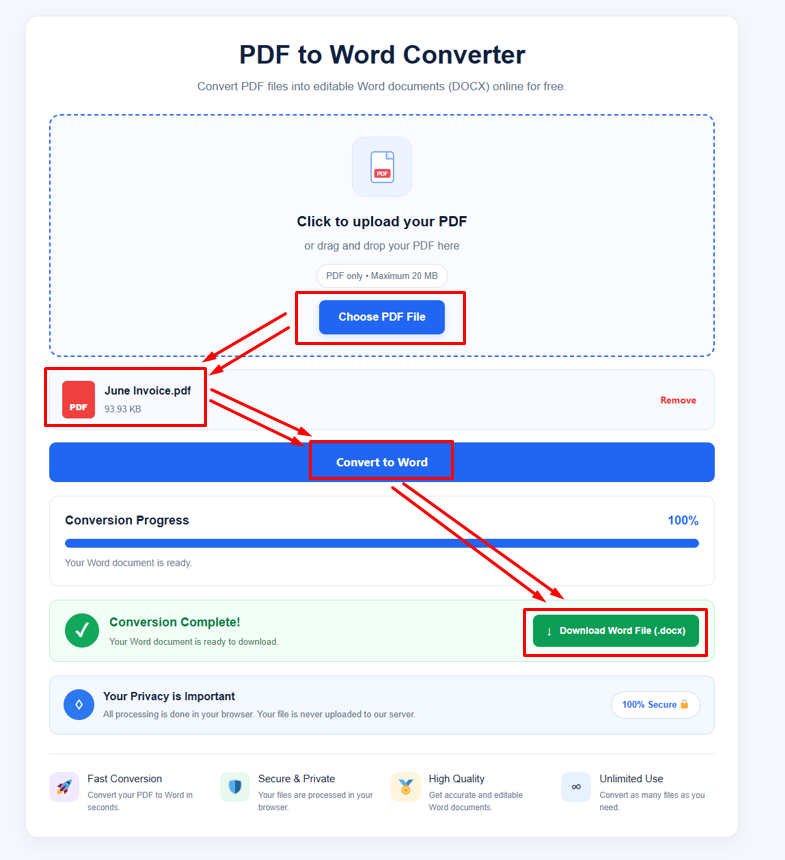
The process is usually straightforward.
You start by uploading your PDF file. The converter reads the document and processes its contents before creating an editable Word version.
A typical workflow looks like this:
For text-based PDFs, the conversion can often be relatively straightforward. Scanned PDFs may require OCR to recognize the text inside the pages.
There are plenty of situations where a Word document is more convenient than a PDF.
If you need to change a sentence, update a date, fix a spelling mistake, or add information, editing a Word document is usually easier than editing a PDF.
You may have an old PDF containing information that you want to use in a new document. Converting it to Word can save you from manually retyping everything.
Business documents, reports, forms, resumes, and other files often need updates over time. Having an editable version makes those changes much easier.
Word gives you more flexibility when you want to adjust headings, paragraphs, spacing, fonts, and other parts of a document.
Zenokit PDF to Word Converter provides a simple online option for converting PDF files into editable Word documents.
If you only need to convert a PDF occasionally, installing complicated desktop software may not be necessary. An online Free PDF to Word Converter can be more convenient for basic conversion tasks.
You can use it when working with documents for school, work, business, or personal projects.
Students often receive study materials, assignments, research papers, and notes in PDF format.
Sometimes you need to edit a section, add your own notes, or move information into another document. Converting the PDF to Word can make those tasks easier.
For example, if you receive a PDF study guide and need to add comments or reorganize sections, working with an editable Word document may be more convenient.
Businesses work with PDFs every day. Reports, invoices, proposals, forms, applications, contracts, and other documents are often shared as PDFs.
But business documents sometimes need to be updated.
A PDF to Word Converter can help when you need an editable version of a PDF rather than starting over with a blank document.
Not every PDF contains actual selectable text.
Some PDFs are created from scanned pages. When you open one of these files, it may look like a normal document, but the pages are actually images.
In these cases, OCR technology can be used to recognize the text inside the scanned pages.
The quality of the result depends on the original scan. Clear, high-resolution scans usually provide better results than blurry or poorly photographed documents.
An online converter can be useful when you don’t want to install additional software.
With Zenokit PDF to Word Converter, you can work with your PDF through your browser and convert it into an editable Word document.
This can be especially convenient when you’re using a different computer or simply need to convert a document quickly.
PDF files can be created in many different ways, so conversion results may vary.
You may be able to work with PDFs containing:
Text-based PDFs are generally easier to convert because the text is already stored digitally. Scanned PDFs may need OCR before their text can be edited.
The quality of your original PDF can affect the final Word document.
For better results:
Complex layouts, unusual fonts, columns, tables, images, and scanned pages may require some manual formatting after conversion.
A resume or business document may have been created in PDF format but later need an update.
Instead of rebuilding the document, converting it to Word can give you an editable starting point.
You can then update contact information, work experience, headings, dates, or other details before saving the document again.
It depends on the PDF.
Simple text-based PDFs usually have fewer formatting challenges. PDFs with complex layouts, multiple columns, tables, graphics, or unusual fonts may not convert perfectly.
For that reason, it’s always a good idea to review the Word document after conversion and make any necessary adjustments.
Zenokit PDF to Word Converter is designed for people who want a straightforward way to turn PDF files into editable Word documents.
You don’t need to understand complicated conversion settings. Upload your file, let the tool process it, and then check the resulting document.
Whether you’re working with a school assignment, business report, resume, scanned document, or personal file, converting PDF to Word can make further editing much easier.
PDF is one of the most convenient formats for sharing documents, but it isn’t always the easiest format to edit.
A PDF to Word Converter gives you a practical way to turn a PDF into editable document content. It can save time when you need to update text, reuse information, or make changes to an existing file.
With Zenokit PDF to Word Converter, you can convert PDF files online and continue working with the resulting Word document. If you’re looking for a Free PDF to Word Converter, Zenokit provides a simple option for everyday document conversion.
A PDF to Word Converter changes a PDF document into an editable Word file so you can modify and reuse its content.
Yes. Zenokit provides a Free PDF to Word Converter for users who need to convert PDF documents into editable Word files.
Yes. An online PDF to Word converter allows you to upload and process your PDF through a web browser without installing traditional desktop software.
Yes. Once the PDF has been converted into an editable Word document, you can make changes to the text and formatting using compatible word-processing software.
Scanned PDFs may require OCR to recognize the text. If the scan is clear enough, OCR can extract the text and make it available in an editable format.
Not always. Simple documents may convert well, while complex layouts, tables, columns, images, and unusual fonts can require some manual adjustment.
Yes, PDF-to-Word conversion can be used for multi-page documents. The exact result can depend on the PDF structure and the converter being used.
Converting a PDF to Word can make it easier to edit text, update information, reuse content, and change document formatting.
Students, teachers, businesses, freelancers, office workers, researchers, and everyday users can benefit from converting PDFs into editable Word documents.
You don’t necessarily need Microsoft Word to perform the conversion itself. An online PDF to Word tool can process the PDF and create an editable Word file. A compatible word processor can then be used to open and edit the resulting document.